
Welcome to the Free Allotment Planner
Planning an allotment properly can save time, prevent overcrowding, and dramatically improve your yields. In this guide, we’ll walk through how to design your layout step-by-step using our free interactive allotment planner, built specifically for UK growing conditions.
The planner uses a simple grid system inspired by square foot gardening, making it easy to design raised beds, organise crop rotation, and test companion planting combinations before anything goes into the ground. Whether you’re starting your first allotment or refining an established plot, this approach keeps your planning visual, practical, and efficient — with no logins, subscriptions, or hidden catches.
Why Growers Use This Planner
- Free to use
- No login required
- Works on desktop, tablet, and mobile
- Companion planting included automatically
- Export layouts as PNG or PDF
Before we begin the step‑by‑step walkthrough, you can open the tool in a new tab and follow along as you read.
Planning Your Allotment This Spring
If you’re planning your allotment this spring, this is usually the point where good ideas turn into workable allotment layouts. Early decisions around spacing, crop choice, and companion planting make the biggest difference later in the season, especially in small allotments or gardens where every square foot counts.
Rather than guessing or overcrowding beds, a visual allotment planner helps you see how everything fits before anything goes in the ground. As a result, you can start the season with a clear plan, avoid common beginner mistakes, and adjust your allotment layout easily as conditions change.
A Free Planner Built for Real UK Allotments
Not all garden planners are designed with UK allotments in mind. Many tools are built for large US backyards or require subscriptions before you can access useful features.
This planner was created specifically for raised beds, traditional allotment plots, and square foot gardening layouts common across the UK. It focuses on practical spacing, companion planting, and flexible grid sizing so you can design realistically for your own growing conditions.
There are no sign‑ups, no locked features, and no hidden tiers. You open it and start planning — simple as that. It’s designed to be practical first — simple enough for beginners, flexible enough for experienced growers.
What You Can Do with This Free Garden Planner
- Create custom layouts using the square foot garden planner UK method.
- Get instant companion planting feedback with the built-in companion planting app
- Plan anywhere — works on desktop, tablet, or mobile
- Start immediately — no sign-up, no tracking, no hidden catches (Revenue comes from Ads)
This isn’t another generic tool. It’s a genuine GrowVeg alternative, combining the ease of square foot gardening with allotment‑focused features — built by and for real UK growers. For more about lunar phases, zodiac signs, and the best planting days, explore the Biodynamic Planting Calendar for UK and US growers.
Not Sure Where to Start?
Watch the short tutorial to see how to set up your grid, drag and drop plants, and check companion planting chart UK combinations. It’s quick, intuitive, and completely free — ideal for both new growers and experienced allotment holders.
Let’s Design Your Allotment Layout Step‑by‑Step
Now that you know what the planner can do, let’s walk through exactly how to use it. You can follow these steps while the tool is open in another tab, adjusting your layout as you go.
1: Select Your Plot Size
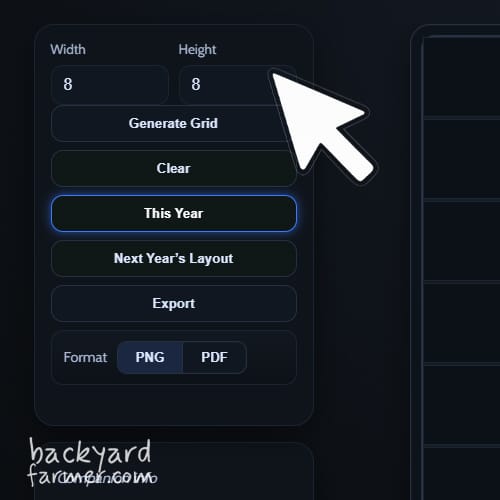
Use the Width and Height controls to match your growing space. Each square represents one square foot, making this ideal for square foot gardening layouts in the UK.
Whether you’re planning a compact raised bed or a full‑sized allotment, the grid adjusts instantly.
Tip: Use Generate Grid to rebuild the grid using new dimensions, use Clear to wipe all crops from the grid.
2: Choose and Place Your Vegetables
Browse the vegetable categories to explore everything from leafy greens to root crops.
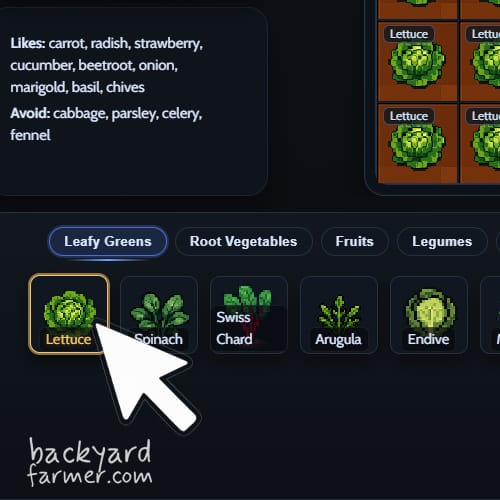
Placement method (desktop & mobile)
- Tap or click a vegetable to select it
- Tap or click any grid square to place it
- Continue tapping grid squares to place more of the same crop
This method works consistently across desktop, tablet, and mobile, with no dragging required.
Tip: Tap the same vegetable again, or use Cancel, to exit placement mode
3: Use Built‑In Companion Planting Feedback
As you design your layout, the planner automatically checks neighbouring crops and highlights relationships:
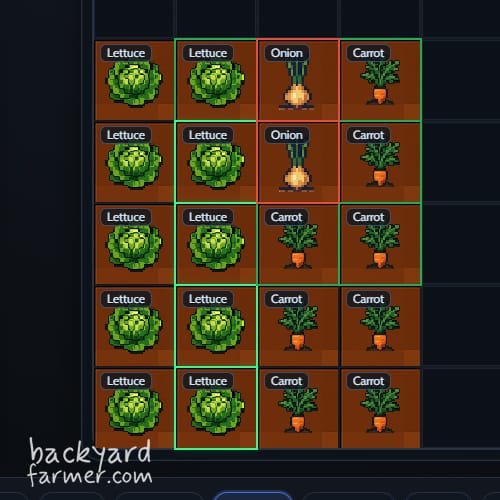
- Green border – good companions (grow well together)
- Red border – poor companions (best avoided)
- Amber border – mixed results (some benefits, some drawbacks)
On desktop, hover over highlighted squares for more detail. On mobile and tablet, simply tap a square to view companion planting insights.
These insights help you build a healthier, more productive allotment plan.
4: Select, Remove, and Adjust Crops
Desktop controls
- Right‑click a crop to remove it instantly
Note: The bottom selection bar is mobile‑only and does not appear on desktop.
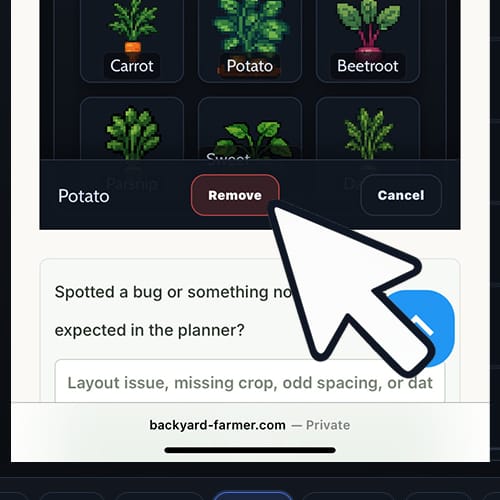
Mobile & Tablet
- Tap a placed crop to select it
- A selection bar appears at the bottom of the screen
- Choose:
- Remove – deletes the selected crop
- Cancel – clears the selection without deleting
This prevents accidental removals and keeps controls within easy thumb reach.
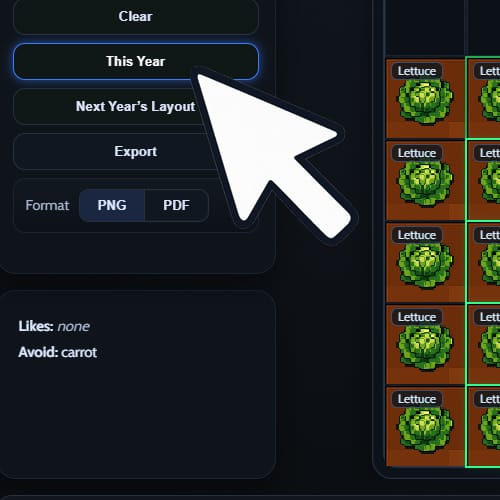
5: Adjust and Refine Your Layout
You can experiment freely as you plan:
- Replace crops by placing a new vegetable over an existing square
- Clear the grid at any time to start again
- Switch between This Year and Next Year layouts to plan crop rotation
This flexibility makes it easy to test ideas and fine‑tune your allotment setup.
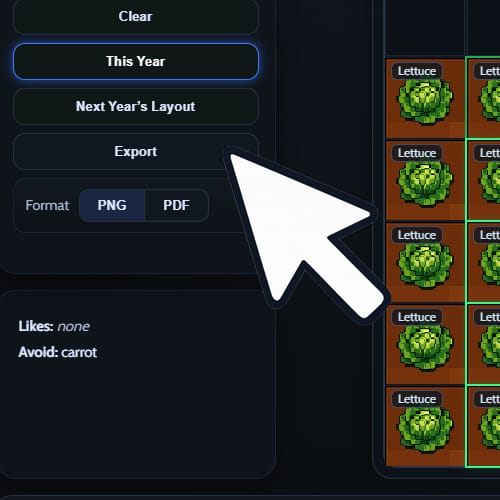
6: Export Your Layout (PNG or PDF)
Once you’re happy with your plan, you can save it for reference:
- Click Export
- Choose PNG (simple image) or PDF (print‑ready)
- Your file downloads instantly
Open it on your phone while planting, or print it and take it to the allotment.
Tool Controls Summary
Desktop
- Click veg → click grid to place
- Right‑click crop to remove
- Hover for companion planting tooltips
Mobile & Tablet
- Tap veg → tap grid to place
- Tap crop → use bottom bar to remove or cancel
- Tap grid squares for insights
General
- Clear button removes all crops
- Generate Grid rebuilds the layout
- Export saves your plan as PNG or PDF
With these streamlined controls, the allotment planner stays fast, simple, and reliable — whether you’re planning at your desk or out in the garden.
Ready to Plan Your Plot?
If you haven’t opened the planner yet, now’s a good time to try it while working through the steps below.
Follow these steps and you’ll have a productive, well‑organised plot using one of the best free vegetable garden planners UK growers can access today. If you’re new to growing, you can apply for an allotment through Gov.uk.
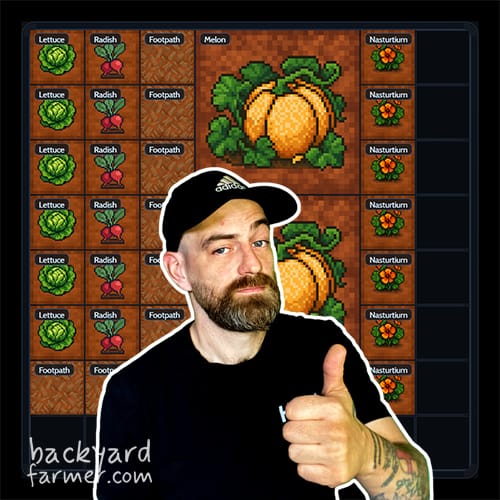
Vote for the Next Features
We’re shaping the future of the Square Foot Allotment Planner together. Have your say by joining our Facebook group poll and voting on which features to build next. Your feedback directly guides development.
Why Use This Planner?
With so many garden planner apps UK available, it’s fair to ask why this one stands out. This planner has also been featured in the National Allotment Society magazine and continues to be shaped by feedback from real allotment growers.
Here’s what makes it the best free allotment planner app UK growers can depend on:
Key Benefits
- Always free — no trials, upsells, or hidden costs.
- Designed for allotments — built for raised beds and real UK veg.
- Square foot gardening planner built in for simple, efficient layouts.
- Companion planting guide UK included automatically.
- Works seamlessly on all devices — desktop, tablet, and mobile.
- No login, no tracking, no data collection — ever.

Built by a Gardener, Improved Continuously
This isn’t a corporate product with slow release cycles. It’s made in‑house me – Fred, so updates roll out fast — often in direct response to feedback. With no big budgets or red tape, this allotment planning tool improves every season.
To learn more about me and what The Backyard Farmer is all about, you can find more info right here!
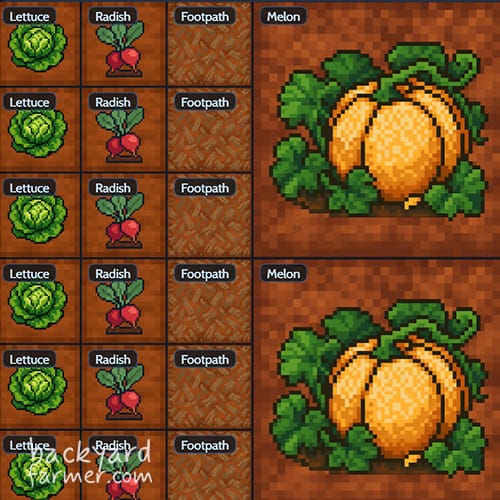
A Retro‑Inspired Look
The planner uses pixel art inspired by cozy games like Stardew Valley. It keeps things approachable and fun while delivering accurate layouts and reliable growing advice. It’s a small detail that makes the companion planting app feel distinctive, memorable, and enjoyable to use.
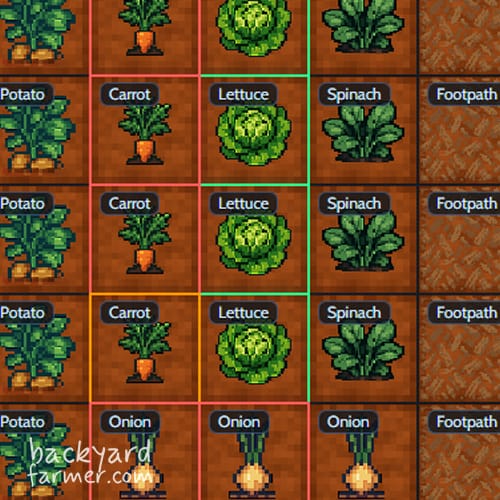
Companion Planting Chart UK: How to Use It
The built‑in companion planting chart UK makes it easy to see which vegetables grow best together — no need to memorise lists. Green borders show good companions, red borders show poor neighbours, and yellow indicates mixed results. Whether you’re pairing carrots with onions or tomatoes with basil, the chart adapts to real UK growing conditions. It’s one of the most practical features of this vegetable plot planner.
How This Planner Compares to Other Garden Planning Apps
You may have come across other garden planning tools online, some of which require subscriptions or account creation before you can fully explore their features. This planner takes a simpler approach:
Key Differences
- No account required
- No subscription fees
- Companion planting built in
- Designed around UK allotment layouts
- Quick PNG and PDF exports
If you’re looking for a straightforward, privacy‑respecting way to plan your plot, this tool keeps things clear and accessible.
Frequently Asked Questions
Here are some of the most common queries about the free allotment planner UK and how to make the most of it. This section also works as a quick companion planting guide UK for growers looking for clear answers.
Yes — completely free. There are no subscriptions, trials, hidden upgrades, or locked features. You don’t need to create an account or enter any details. Simply open the planner and start designing your allotment layout.
The tool is supported by simple on-page advertising, which helps cover hosting and development costs so it can remain accessible to UK growers.
No. There is no login system, no data collection, and no tracking beyond standard website analytics. Your layouts are created and exported directly in your browser.
Absolutely. The grid size is fully adjustable, so you can plan small raised beds, compact square-foot layouts, or scale up to a traditional 10×10 metre allotment. The flexible grid makes it suitable for beginners and experienced growers alike.
Yes. The built-in companion planting system highlights relationships automatically using colour-coded borders:
– Green – good companions
– Red – poor companions
– Amber – mixed results
This makes it easy to design healthier, more balanced planting combinations without memorising charts.
It’s an independent garden planning tool built specifically for UK allotment growers. Unlike many online planners, it doesn’t require a subscription or account to access core features. Companion planting guidance, flexible grids, and export options are all included from the start.
Yes. You can export your layout as a PNG image or PDF file. This allows you to print your plan or keep a copy on your phone while planting at the allotment.
For a full seasonal overview, explore our Vegetable Planting Calendar to plan sowing and harvest times throughout the year.
Changelog and Roadmap
This online garden planner free tool continues to evolve thanks to feedback from growers like you. Updates are made through small, considered iterations, focusing on clarity, reliability, and real-world usefulness rather than frequent changes.
As a rule, the planner is reviewed and updated roughly every three months, based on how people actually use it. This helps keep the tool stable and familiar, while allowing steady improvements over time.
Spotted a bug or got an idea? Drop us a note at planner@backyard-farmer.com — we’d love to hear from you. This allotment layout planner will keep improving season after season, whether you’re planning a small raised bed or managing a larger growing space in the UK.
- Launched the first version with core grid-based planning.
- Added initial vegetable options.
- Added PDF export for printable layouts.
- Introduced full-screen mode.
- Improved mobile usability & touch support.
- Expanded guide and layout handling tools.
- Introduced the new retro pixel-art UI design.
- Expanded the full veg library, including companion-planting rules.
- Added PDF export with companion-planting reference panel.
- Improved mobile drag-and-drop interactions.
- Added fruit tree layout support (spacing + category options).
- Added Export to PNG for clean single-image garden layouts.
- Improved PDF export boundaries, cropping, and output quality.
- Improved visual clarity for grids, icons, and tool panels.
- Fixed several sprite alignment issues.
- Improved category sorting and bottom-menu rendering.
- Fixed Next Year / This Year state switching bug where changes weren’t saved properly.
- Fixed Squash Family icons still pulling in legacy sprites on the grid.
- Updated all squash icons
- Synced veg menu + grid tile renderer to the same icon source
- Cleaned up internal crop ID and icon mapping.
- Minor stability improvements around drag-placement.
- Added support for decorative sprite layers (future gnomes, stepping stones, etc.).
- Added internal support for seasonal themes (not yet exposed in UI).
This update focuses on making the planner easier to use, more reliable, and better suited to UK growers.
- Undo now works properly across all actions (including clearing the grid)
- Save and Print buttons have been simplified
- You can now zoom the grid in and out to suit your layout
- The planner layout has been improved, with the grid now centred
- Crop names have been updated to UK-friendly terms (Rocket, Aubergine, etc.)
- General improvements to performance, stability, and future development
Transparency: How It’s Funded
The planner remains free thanks to simple on‑page advertising. There are no subscriptions, no sign‑ups, and no data selling. Ads help cover hosting and development costs so the tool can stay available to UK growers without paywalls.
That’s it — a straightforward, ad‑supported tool built by a gardener for gardeners.
Feature Comparison Table
| Feature | This Planner | GrowVeg | Other Tools |
|---|---|---|---|
| Free to use | Yes | No (subscription) | Varies |
| UK allotment layouts | Yes | Partial | Rare |
| Requires login | No | Yes | Usually |
| Built‑in companion planting | Yes | Limited / add‑on | No |
| Privacy‑respecting | Yes | Mixed | Mixed |
| Export to PDF | Yes | Yes | Sometimes |
Continue your allotment planning & planting journey
- What vegetables are good to grow – Learn which crops are most productive and easy to manage, perfect for planning companion spacing
- Square-foot gardening UK complete guide – A broader step-by-step system for high-yield allotment beds using the square-foot method
- How to grow leafy vegetables at home – Tips on maximising space and yields with leafy greens that work especially well in planned allotment beds