

Free UK Allotment Planner
Use this free online allotment planning software to design beds and paths, organise crop spacing and test layouts before anything goes in the ground. Built for UK growers, it works for everything from a small veg patch to a full allotment plot, with no account required. Open Tutorial in the top menu for a quick walkthrough.
What You Can Do With the Planner
Use the planner to build your allotment layout, organise crops and follow your plan through the growing season.
| Feature | What it does |
|---|---|
| Build Your Plot | Lay out growing areas, paths and other surfaces to match your garden or allotment. |
| Plan Your Crops | Place crops on the plan and check useful growing information such as spacing and companion guidance. |
| Add Covers | Plan protected growing areas such as greenhouses, polytunnels and crop covers. |
| Plan Through the Seasons | Review how sowing, planting and harvesting change through the growing year. |
| Track Your Plan | Record planting dates and keep useful crop information alongside your layout. |
| Save & Export | Save your plan in the browser and export or print a copy for use on the plot. |
New to the planner? Use the Tutorial button inside the app for a guided walkthrough of the main planning tools.
Use This Free UK Allotment Planner
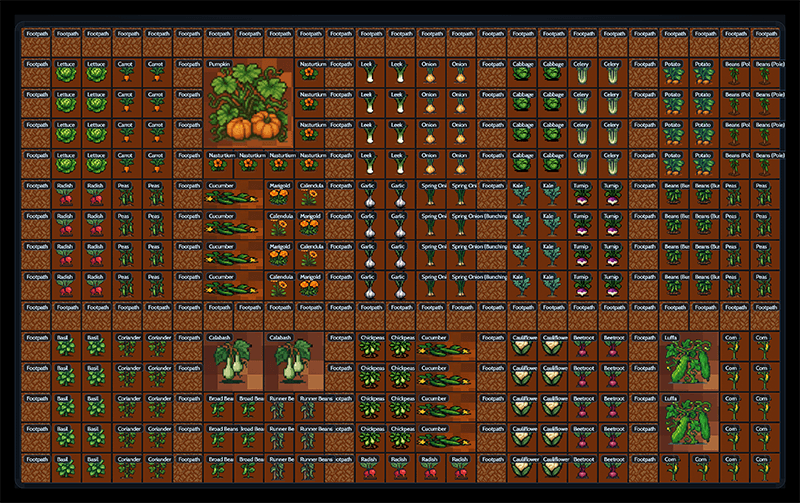
Use the planner to design a full allotment, half plot or a few raised beds, mapping out growing areas, paths and fixed features before you plant. The layout is based on a simple square-foot grid, but it also works as a flexible allotment layout planner if you prefer to measure in metres. If you are still deciding where everything should go, our beginner’s guide to allotment planning walks you through the process step by step.
Why it works well for allotments
A simple grid makes it easier to visualise space, avoid overcrowding and organise crops around the way you actually garden. Think of it as a flexible starting point rather than a set of rigid planting rules.
Updates & Changelog
This online garden planner free tool continues to evolve thanks to feedback from growers like you. Updates are made through small, considered iterations, focusing on clarity, reliability, and real-world usefulness rather than frequent changes.
- Launched the first version with core grid-based planning.
- Added initial vegetable options.
- Added PDF export for printable layouts.
- Introduced full-screen mode.
- Improved mobile usability & touch support.
- Expanded guide and layout handling tools.
The Garden Planner received a major visual refresh alongside improvements to its crop library, planning tools, mobile usability and export options. This update also expanded support for a wider range of garden layouts while keeping the core planning experience straightforward.
This update improved the planner’s export tools, visual clarity and overall interface consistency. It also included a range of smaller layout and rendering fixes to make the planner feel cleaner and more reliable across different devices.
This update focused on improving planner reliability, crop display consistency and year-to-year planning behaviour. It also included visual refinements and smaller stability improvements to make placement and editing feel more dependable.
This update introduced behind-the-scenes improvements to the planner’s visual system, creating a stronger foundation for future decorative and seasonal enhancements without adding extra complexity to the current interface.
This update focused on making the Garden Planner easier to use, more reliable and better suited to UK growers. It included improvements to editing, layout controls, crop naming, performance and overall stability across the planner.
This update streamlined the Garden Planner to make it quicker and easier to use, with a simpler layout, improved canvas behaviour and a more intuitive planning flow. Crop information was also expanded and presented more clearly, helping users understand spacing, planting and companion guidance without making the interface feel cluttered.
This update improved how plans are saved, revisited and exported, making the overall workflow smoother and more reliable. It also made it easier to return to an existing layout and continue planning without unnecessary setup.
This update refined the Allotment Planner interface to make it cleaner, more consistent and easier to use across desktop, tablet and mobile. It also improved navigation, crop selection and layout behaviour while keeping the overall experience simple and app-like.
This update expanded the Allotment Planner to support protected growing areas alongside crops, making it easier to plan a wider range of real garden and allotment setups. It also refined layer controls and simplified the mobile experience so the planner remains easy to use across different screen sizes.
This update expanded the Allotment Planner with improved seasonal planning and guidance, helping users better understand how their layout changes through the growing year. It also included usability, tutorial and layout refinements to make the planner easier to explore and manage.
This update expanded the Allotment Planner’s layout tools, making it easier to build the structure of a plot before adding crops and seasonal planning. It also improved interaction, navigation, performance and overall interface clarity across the planner, helping larger and more detailed layouts feel smoother to work with.
This update focused on making the Allotment Planner easier to understand from the first use, with clearer guidance, improved mobile behaviour and a more polished interface. It also refined loading feedback, toolbar organisation and light-mode readability to make the planner feel smoother across different devices.
This update significantly improved the crop Field Guide, making growing information clearer and easier to browse while planning. It also refined crop notes, companion guidance, accessibility and responsive behaviour without adding extra complexity to the main planner.
This update expanded the Garden Planner’s crop coverage and improved seasonal planning throughout the year, with particular attention to autumn and winter growing. It also refined crop information and overall usability while keeping the planner simple and practical to use.
Frequently Asked Questions
Here are a few common questions about the free allotment planner and how to use it.
Yes — completely free. There are no subscriptions, trials, hidden upgrades, or locked features. You don’t need to create an account or enter any details. Simply open the planner and start designing your allotment layout.
The tool is supported by simple on-page advertising, which helps cover hosting and development costs so it can remain accessible to UK growers.
No. There is no login system, no data collection, and no tracking beyond standard website analytics. Your layouts are created and exported directly in your browser.
Absolutely. The grid size is fully adjustable, so you can plan small raised beds, compact square-foot layouts, or scale up to a traditional 10×10 metre allotment. The flexible grid makes it suitable for beginners and experienced growers alike.
Yes. The built-in companion planting system highlights relationships automatically using colour-coded borders:
– Green – good companions
– Red – poor companions
– Amber – mixed results
This makes it easy to design healthier, more balanced planting combinations without memorising charts.
It’s an independent garden planning tool built specifically for UK allotment growers. Unlike many online planners, it doesn’t require a subscription or account to access core features. Companion planting guidance, flexible grids, and export options are all included from the start.
Yes. You can export your layout as a PNG image or PDF file. This allows you to print your plan or keep a copy on your phone while planting at the allotment.
More Free Interactive Tools
The Square Foot Garden Planner works best when combined with the free planning tools below. Use them to decide what to plant, when to sow, and how to organise your garden throughout the year.

Support This Free Garden Planner
The Square Foot Garden Planner was built to help gardeners quickly design productive raised beds without complicated spreadsheets or paid software.
I keep the tool free to use, with no subscriptions or sign-ups required.
If the planner helps you design your garden, you can support the project with a small contribution. Your support helps keep the planner running, improves future updates, and funds new free gardening tools.

Thank you for helping keep independent gardening resources free and accessible for everyone.